
For GTA 6 on Xbox Series X|S, get the standard Xbox Wireless Controller in Carbon Black. It’s Windows Central’s best overall Xbox pad, though it runs on AA batteries. On PS5, the DualSense in the box already does everything Sony lists for GTA 6. If you want an upgrade, get the DualSense Edge, whose replaceable sticks answer the drift problem. For sound on either console, the wired HyperX Cloud III is the one headset we’d buy. GTA 6 is a single-player game, so comfort and sound matter more than the mic.
Researched across 18 sources, including Sony and Microsoft’s official GTA VI listings, console support guides, maker spec sheets, and reviews from IGN, PCWorld, Windows Central, TechRadar, Tom’s Hardware and PC Gamer.
We earn a commission from qualifying purchases made through links on this page.
Our picks at a glance
| Xbox Wireless Controller | DualSense Edge | HyperX Cloud III | |
|---|---|---|---|
| Console | Xbox Series X|S | PS5 | PS5 and Xbox Series X|S |
| Power | AA batteries, up to 40 hours (Microsoft) | Built-in battery, just over 7 hours in TechRadar’s test | Wired |
| Connection | Xbox Wireless, Bluetooth, USB-C | Wireless, braided USB-C cable | 3.5mm, USB-C, USB-A |
| Standout | Hybrid D-pad, 3.5mm headset jack | Swappable sticks, 2 back buttons | 53mm drivers, detachable mic |
| Review verdict | Windows Central best overall | IGN 9/10 | Tom’s Hardware 4/5, PC Gamer 77 |
| Our pick for | Xbox players | Pro-level control on PS5 | One headset for both consoles |
We picked from headsets you can buy now. Some rivals still recommend Sony’s Pulse Elite, which we passed over.
What GTA 6 uses on each console
Sony’s GTA VI listing says the game supports the DualSense’s vibration and trigger effects. Sony’s June 24 PlayStation Blog post adds that “The controller’s haptic feedback offers responsive vibrations, while its adaptive triggers provide dynamic resistance.” The same listing names Tempest 3D Audio and says GTA VI is “PS5 Pro Enhanced.”
The Xbox Store listing is plainer. It names single player and Optimized for Xbox Series X|S, with no controller or spatial audio features listed.
Both listings say the same thing about play: “Grand Theft Auto VI is a single-player experience.” Rockstar hasn’t published GTA 6’s control layout yet, so we don’t guess at button mappings here.
Which setup fits you?
Pick your console, then how much you want to spend and how you like to play.
- PS5, spending as little as possible. Keep the DualSense from the box and add the HyperX Cloud III. Turn on 3D Audio (setup steps).
- PS5, ready to spend more, with drift worries or long sessions. Get the DualSense Edge. Swap a worn stick module instead of the whole controller. Keep the braided cable handy for long sessions.
- PS5, shootouts first. The Edge lets you adjust stick sensitivity, dead zones and trigger dead zones, and put any button on the back paddles.
- PS5, drive-heavy. Any DualSense gives you the adaptive triggers Sony lists for GTA 6. Upgrade to the Edge only if you also want back buttons or swappable sticks.
- Xbox, any budget. Get the Xbox Wireless Controller and the Cloud III, plugged into the controller’s jack. Keep spare AAs nearby.
- Xbox, shootouts first. Remap buttons in the free Xbox Accessories app (setup steps).
- Both consoles in the house. One Cloud III covers both.
Rockstar hasn’t published GTA 6’s control layout yet.
The controllers
Xbox Wireless Controller, Carbon Black
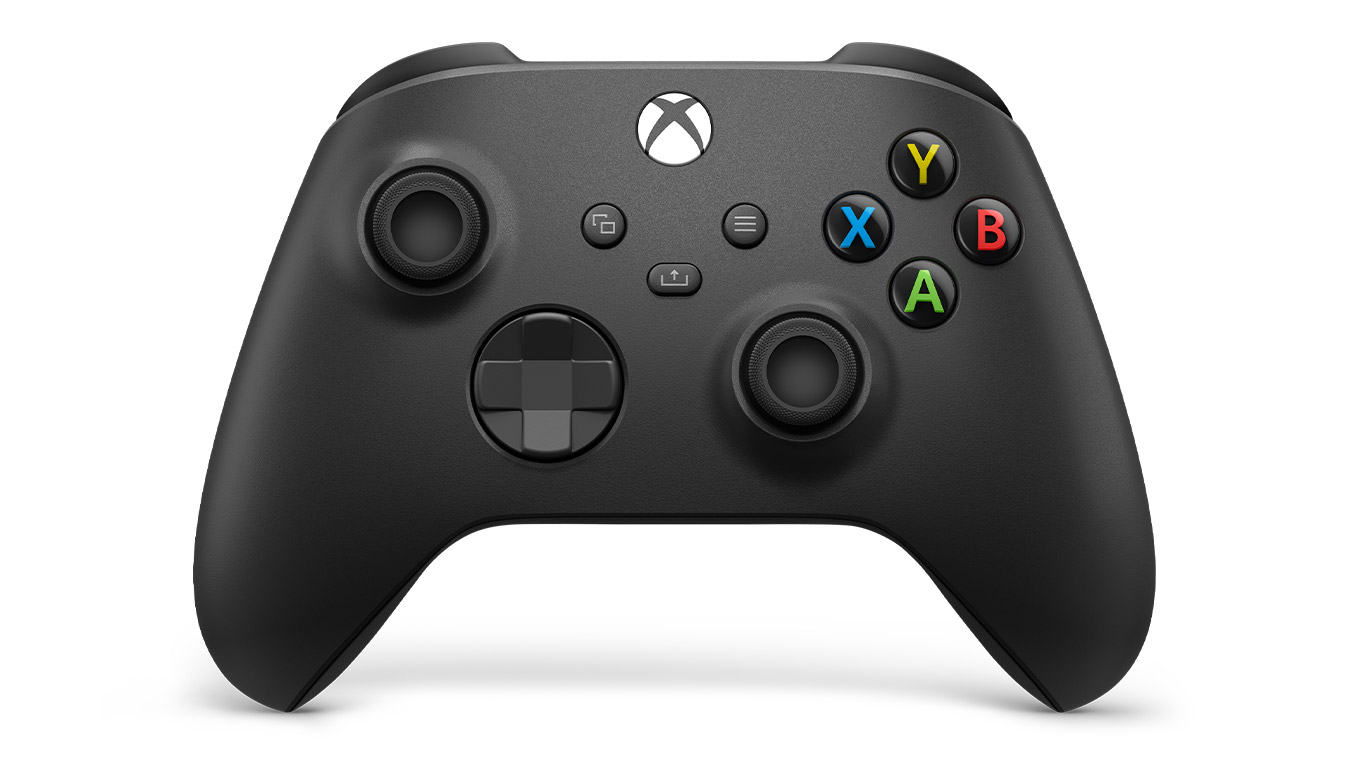
Xbox Wireless Controller, Carbon Black
- Windows Central's best overall Xbox controller
- Button remapping in the free Xbox Accessories app
- Up to 40 hours per set of AA batteries, per Microsoft
- Runs on AA batteries, with no rechargeable pack included
- No Hall effect sticks, so it can drift over time, per Windows Central
- PCWorld found the Share button hard to reach
Check price on Amazon(paid link)
This is the controller Xbox Series X|S was built around, and Windows Central’s best overall pick: “The standard Xbox Series X|S controller offers the perfect balance of performance and value for money.” PCWorld’s Ryan Whitwam agrees: “Microsoft made an already excellent game controller even better with strategic tweaks to the buttons, shape, and USB port.” It runs on AA batteries, and the headset jack means a wired headset needs no adapter.
Pros
- Windows Central’s best overall Xbox controller
- Button remapping in the free Xbox Accessories app
- Up to 40 hours per set of AA batteries, per Microsoft
Cons
- Runs on AA batteries, with no rechargeable pack included
- No Hall effect sticks, so it can drift over time, per Windows Central
- PCWorld found the Share button hard to reach
Start with the DualSense you already own
Every PS5 comes with a DualSense, and that’s the controller Sony’s GTA VI listing names for vibration and trigger effects. IGN’s Mike Epstein gave it 9/10 at launch: “With the DualSense, Sony has both made a more comfortable gamepad for traditional gameplay, and introduced some very exciting features.”
Owner reports for the DualSense often mention stick drift. The standalone Midnight Black model is also sold by a third-party seller on Amazon right now, so we haven’t linked a spare. If drift is what’s pushing you to replace your controller, the Edge below is built to fix it.
DualSense Edge, Midnight Black
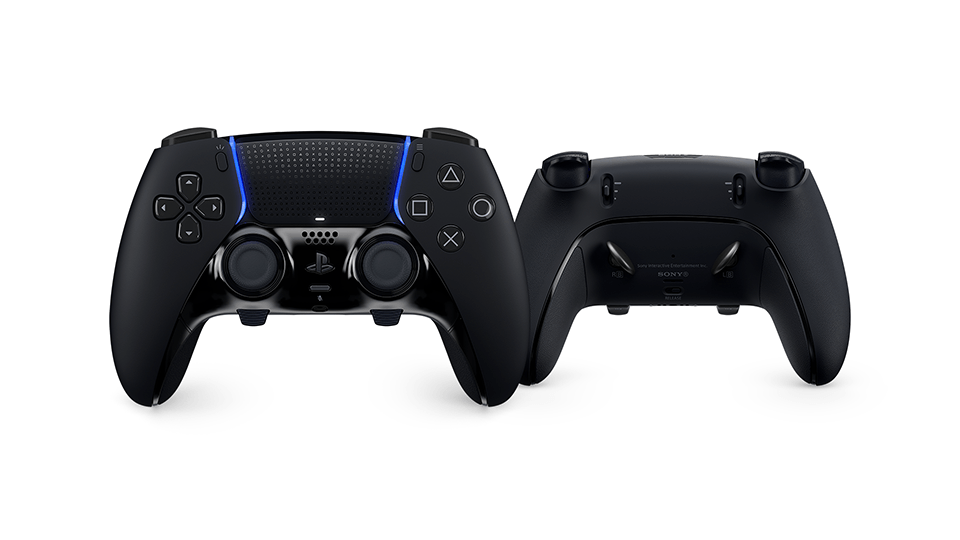
PlayStation DualSense Edge Wireless Controller, Midnight Black
- Replaceable stick modules, so a worn stick doesn't mean a new controller
- Two back buttons, remappable controls and quick-swap profiles
- Haptic feedback and adaptive triggers, like the standard DualSense
- Shorter battery life than the standard DualSense, which Sony admits
- Replacement stick modules are sold separately
- Costs far more than a standard DualSense
Check price on Amazon(paid link)
IGN’s Matthew Adler scored the Edge 9/10 and wrote: “The DualSense Edge’s killer feature is fully replaceable analog stick modules.” When a stick wears out, you swap the module instead of buying a new controller. It’s otherwise close to the standard pad: “there’s a ton of fantastic tech packed into a controller that’s virtually the same size and shape you’re already used to,” Adler writes. Battery life is the trade-off. IGN’s ran out at about 5.5 hours, and Sony admits it’s “moderately shorter” than the standard DualSense, per TechRadar. Sony calls its slip-resistant grips “Ideal for long sessions in single player games.”
Pros
- Replaceable stick modules, so a worn stick doesn’t mean a new controller
- Two back buttons, remappable controls and quick-swap profiles
- Haptic feedback and adaptive triggers, like the standard DualSense
Cons
- Shorter battery life than the standard DualSense, which Sony admits
- Replacement stick modules are sold separately
- Costs far more than a standard DualSense

The headset
HyperX Cloud III (wired)
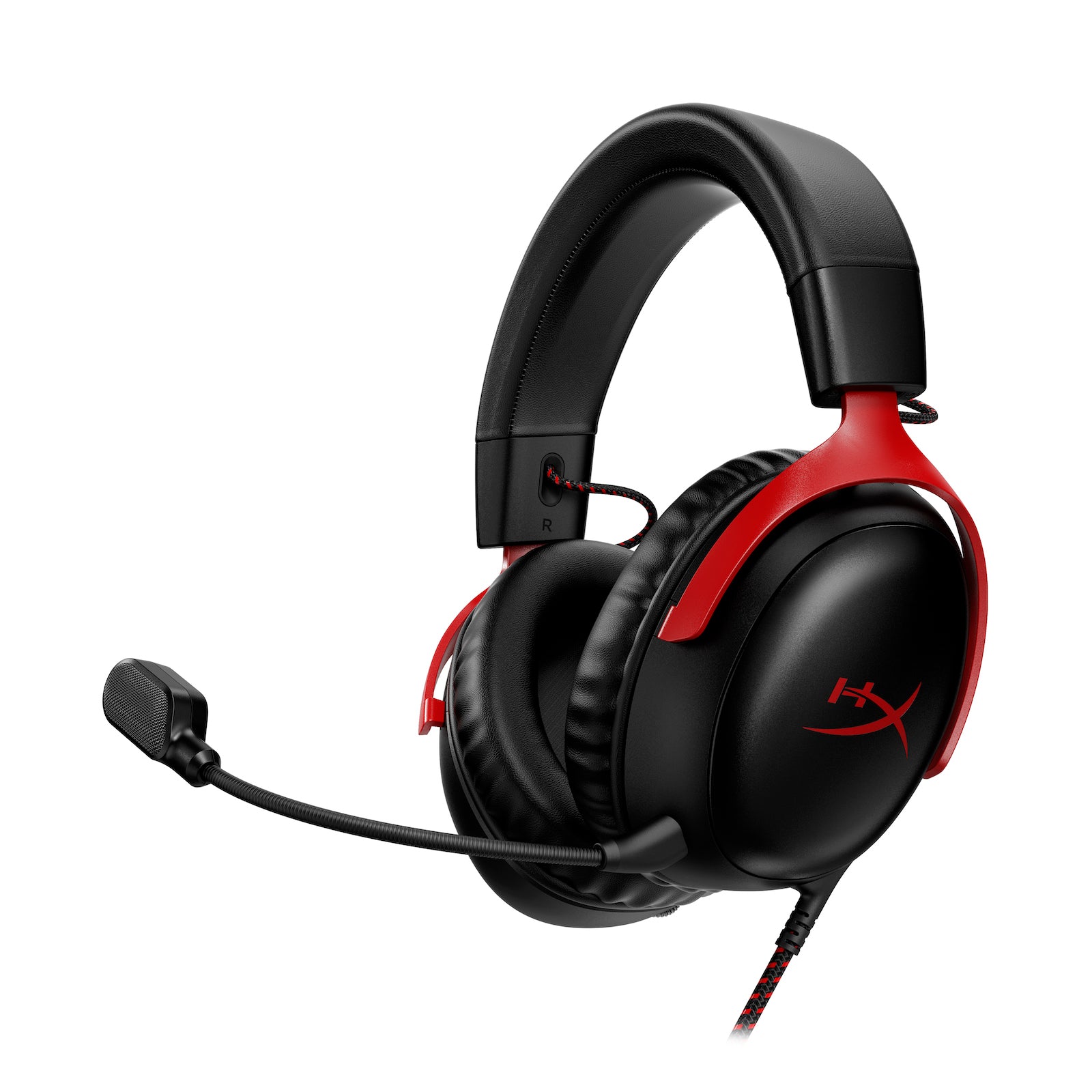
HyperX Cloud III Wired Gaming Headset, Black/Red
- Very comfortable, per both Tom's Hardware and PC Gamer
- Works on PS5, Xbox Series X|S and PC from one wired headset
- Strong bass, per both reviews
- Virtual surround is weak, and HyperX's surround mode is for PC only
- On Xbox it connects through the controller's jack, analog only
- PC Gamer found better options at the same price
Check price on Amazon(paid link)
One wired headset that works on both consoles. On PS5 it plugs in by USB. On Xbox it plugs into the controller’s 3.5mm jack, which Tom’s Hardware notes is analog only. Tom’s Hardware gave it 4/5 and listed “Very comfortable” and “Fantastic bass” among its reasons to buy. PC Gamer scored it 77 and found better options at the same price, but added: “If you need comfort over anything else, the Cloud III is a great pick.” HyperX’s own surround mode is for PC only, so on consoles use the console’s 3D audio setting instead.
Pros
- Very comfortable, per both Tom’s Hardware and PC Gamer
- Works on PS5, Xbox Series X|S and PC from one wired headset
- Strong bass, per both reviews
Cons
- Virtual surround is weak, and HyperX’s surround mode is for PC only
- On Xbox it connects through the controller’s jack, analog only
- PC Gamer found better options at the same price
Set up before November 19
These steps come from Sony and Microsoft’s own support pages. Do them once and they carry into GTA 6.
- 1
PS5: turn on 3D Audio for headphones
Go to Settings > Sound > 3D Audio (Headphones). Create a personalized profile or pick one of five presets, then turn on Enable 3D Audio for Headphones.
- 2
DualSense Edge: build a profile
Press the Fn button and Options to open the customization menu. You can remap buttons, adjust stick sensitivity and dead zones, change trigger dead zones and vibration intensity, then switch profiles on the fly.
- 3
Xbox: turn on Windows Sonic
Xbox Support says you can use spatial sound with any headset. Press the Xbox button, then go to Profile & system > Settings > General > Volume & audio output > Headset audio > Headset format, and choose Windows Sonic for Headphones. Microsoft's GTA VI listing doesn't mention spatial audio, so treat this as a console setting, not a confirmed game feature.
- 4
Xbox: remap buttons
Microsoft lists button mapping in the free Xbox Accessories app for Xbox Series X|S.
Before preload opens at local midnight on November 12, make sure the game will fit. See our PS5 storage guide or our Xbox storage and expansion card guide.
Quick questions
Does GTA 6 use the DualSense’s haptics and adaptive triggers? Yes. Sony’s GTA VI listing says vibration and trigger effects are supported on the DualSense.
Do I need a headset with a good mic for GTA 6? Sony and Microsoft both call GTA VI a single-player experience, so comfort and sound matter more than the mic.
Does the Cloud III work on Xbox? Yes, through the 3.5mm jack on the Xbox Wireless Controller. HyperX’s surround mode is for PC only.
Sources
- PlayStation, Grand Theft Auto VI: https://www.playstation.com/en-us/games/grand-theft-auto-vi/
- PlayStation Blog, “Grand Theft Auto VI plays best on PS5, November 19,” Mary Yee, Jun 24, 2026: https://blog.playstation.com/2026/06/24/grand-theft-auto-vi-plays-best-on-ps5-november-19/
- Microsoft Store, Grand Theft Auto VI: https://www.xbox.com/en-US/games/store/grand-theft-auto-vi/9NL3WWNZLZZN
- Rockstar Support, “Grand Theft Auto VI platform editions and versions,” updated Aug 18, 2026: https://support.rockstargames.com/articles/4QfG4FmZCf5W1gS8jy4UVT/grand-theft-auto-vi-platform-editions-and-versions
- Xbox, Xbox Wireless Controller: https://www.xbox.com/en-US/accessories/controllers/xbox-wireless-controller
- PCWorld, Xbox Wireless Controller review, Ryan Whitwam, Aug 17, 2022: https://www.pcworld.com/article/831843/xbox-wireless-controller-review.html
- Windows Central, best Xbox controllers, updated Jan 14, 2026: https://www.windowscentral.com/best-xbox-controller
- PlayStation, DualSense Edge wireless controller: https://www.playstation.com/en-us/accessories/dualsense-edge-wireless-controller/
- IGN, DualSense Edge review, Matthew Adler, Jan 23, 2023: https://www.ign.com/articles/dualsense-edge-review
- TechRadar, DualSense Edge vs Xbox Elite Series 2, Rhys Wood: https://www.techradar.com/versus/dualsense-edge-vs-xbox-elite-controller-series-2-which-is-the-best
- IGN, DualSense controller review, Mike Epstein: https://www.ign.com/articles/ps5-dualsense-controller-review
- PlayStation Blog, Midnight Black PS5 accessories, Jan 7, 2025: https://blog.playstation.com/2025/01/07/new-midnight-black-collection-of-ps5-accessories-launches-next-month/
- HyperX, Cloud III wired gaming headset: https://hyperx.com/products/hyperx-cloud-iii-wired-gaming-headset
- Tom’s Hardware, HyperX Cloud III review, Sarah Jacobsson Purewal, May 30, 2023: https://www.tomshardware.com/reviews/hyperx-cloud-iii
- PC Gamer, HyperX Cloud III review, Jorge Jimenez, Jun 9, 2023: https://www.pcgamer.com/hyper-x-cloud-iii-gaming-headset-review/
- PlayStation Support, 3D audio on PS5: https://www.playstation.com/en-us/support/hardware/3d-audio-ps5/
- Xbox Support, Windows Sonic and Dolby Atmos headset settings: https://support.xbox.com/en-GB/help/hardware-network/accessories/windows-sonic-dolby-atmos-headset-settings-xbox-one
- Rockstar Games, GTA VI screenshots: https://www.rockstargames.com/VI/media/screenshots